Know how baby's day went, without texting the nanny all day.
Your nanny or grandparent taps ✓ when the day goes to plan and writes only what changed. At pickup you read one short summary: feeds, naps, diapers and anything unusual.
Demo uses a sample baby, no sign-up. The app is $34.99 once for the whole household, with no subscription.
Twelve texts by 4pm, and you still don't know how the day went.
Texting interrupts the person looking after your baby, and a paper notebook never makes it to your desk. The Handoff Sheet gives you the whole day in one place.
How it works
Most baby trackers ask the caregiver to log every bottle and every nap. Caregivers stop after a week. The Handoff Sheet asks only about what was different.
Write the usual day once
Set your baby's normal feeds, naps and meals. Start from a newborn, infant or toddler routine and adjust it.
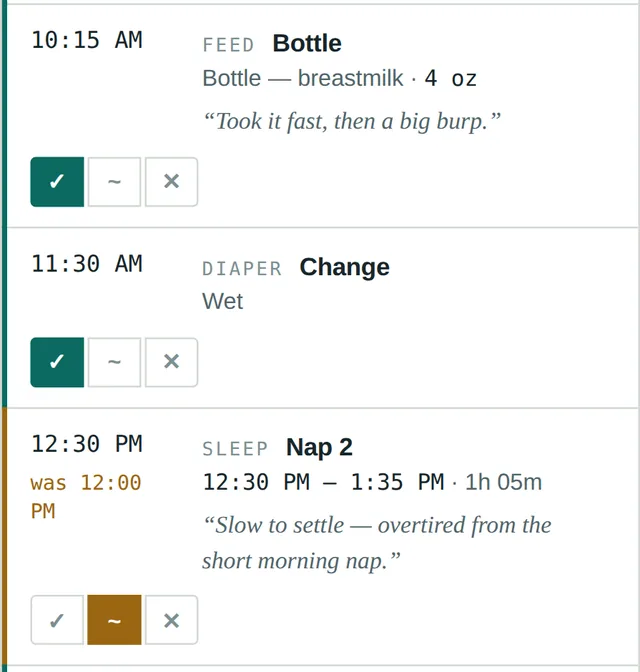
The caregiver confirms or notes changes
Each item gets ✓ (as planned), ~ (changed) or × (didn't happen), plus a line of notes if needed. That's the whole job.
You read one summary
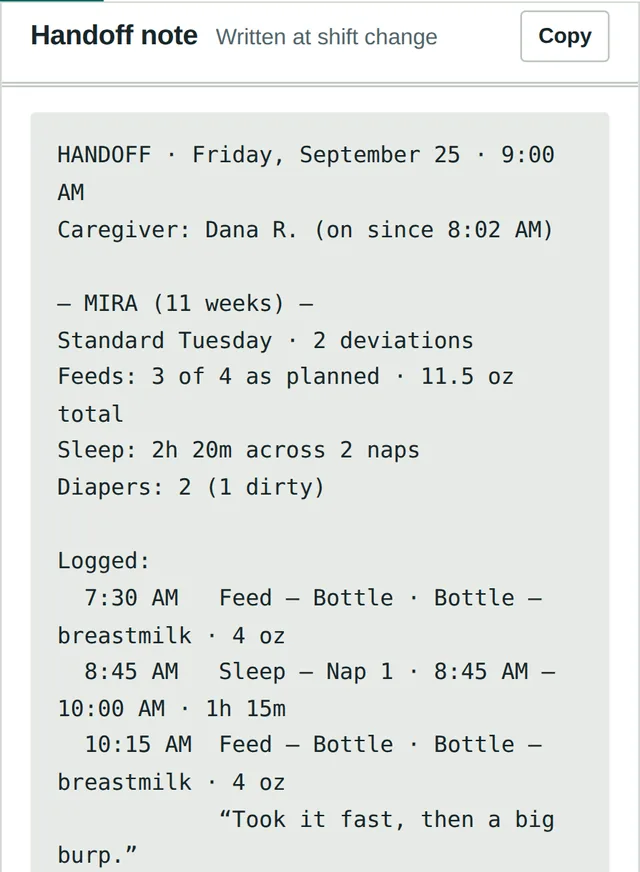
A written handoff note is ready at pickup, and you can check the sheet from work any time during the day.
Easy for the person who has to use it
If grandma won't use it, it doesn't work. So there's nothing for her to install or sign up for.
For parents
- See feeds, sleep and diapers from your desk, without interrupting anyone
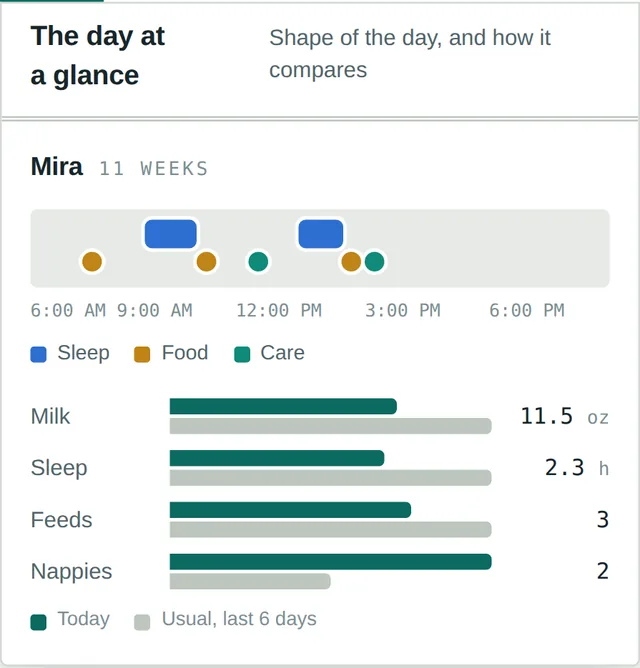
- Compare today with your baby's normal week
- Look back at earlier days when you wonder "what happened on Thursday?"
- One household, several children, several caregivers
For nannies and grandparents
- Type one join code once. No account, no password, no app store
- Works in the browser of any phone
- Tap ✓ for what went to plan and write only what changed
- Keeps working without signal and syncs later
Paper log, tracker app, or The Handoff Sheet?
A paper log is easy to fill in but stays at home. A tracker app reaches your phone but asks the caregiver to log everything.
| Paper nanny log | Baby tracker apps | The Handoff Sheet | |
|---|---|---|---|
| Check it from work | No | Yes | Yes |
| What the caregiver logs | Everything, by hand | Every feed, nap and diaper | Only what changed |
| Caregiver needs an account | No | Usually | No, just a join code |
| Written summary at pickup | If they remember | Sometimes | Every day |
| Price | Free to a few dollars | Often a monthly subscription | $34.99 once |
Start free. Pay once if it works for you.
No subscription, no per-caregiver fees.
Printable log
For families who like paper, or want to try the idea first.
- Daily log sheet
- "Our usual day" routine page
- Fridge info and emergency sheet
- A4 and US Letter PDF
Demo
The full app with a sample baby and a sample day. Nothing to install.
- Tick through a real shift
- See the day at a glance
- Read a sample handoff note
- No sign-up
The Handoff Sheet
For your whole household: parents, nanny and grandparents.
- All children, all caregivers
- Daily handoff notes and history
- Week view and health tab
- Lost code? Get it back with your licence key
Questions parents ask
Does my nanny or grandparent need to make an account or install an app?
No. You give them a join code. They type it once into their phone's browser and they're in: no account, no password, no app store.
How much does it cost?
$34.99 once for the whole household, with no monthly subscription. You can try the full demo free before you buy, and the printable nanny daily log is free.
Which phones does it work on?
Any phone, tablet or computer with a modern web browser: iPhone, Android, Windows or Mac.
Can I track more than one child, or have more than one caregiver?
Yes. Each child gets their own routine and sheet, and anyone you give the join code to (nanny, grandparent, partner) can log and read the day.
What ages is it for?
Newborns, infants and toddlers. It comes with starting routines for each stage that you adjust to your own child's day.
Does it work without signal?
Yes. The sheet keeps working offline and syncs as soon as the phone is back online.
What if I lose the join code, or it gets shared?
Enter your licence key again and you get the same code back with everything still in it. If the code gets out, replace it from Setup: your history moves to the new code and the old one stops working.
Who can see my child's log?
Only people who have your household's join code. There are no public profiles and nothing is shared.
See a whole day in 30 seconds.
Open the demo, tick through a sample shift and read the handoff note it writes.